Export
Ilena exports the work you have open as a PDF, a plain text file, or a Markdown file, matching what's on screen.
Exporting a workDirect link to Exporting a work
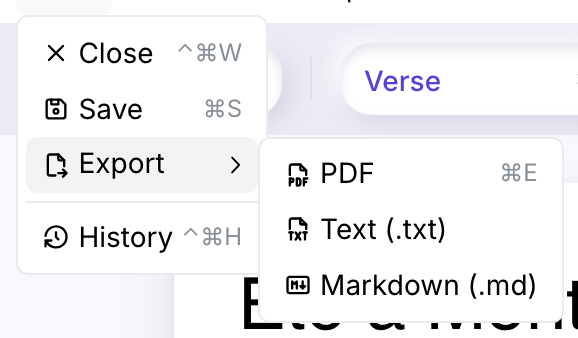
- Open the work you want to export.
- Choose Work → Export, which opens a submenu with three formats: PDF, Text (.txt), and Markdown (.md).
- Pick a format. Your browser downloads a file built from the work's last saved version — changes you haven't saved yet aren't included, so save first if you want them in the file.
Cmd/Ctrl+E stays bound to the PDF entry specifically — it's the shortcut you already had, and it keeps doing what it always did. Text and Markdown are only reachable from the submenu.
Why Export is greyed outDirect link to Why Export is greyed out
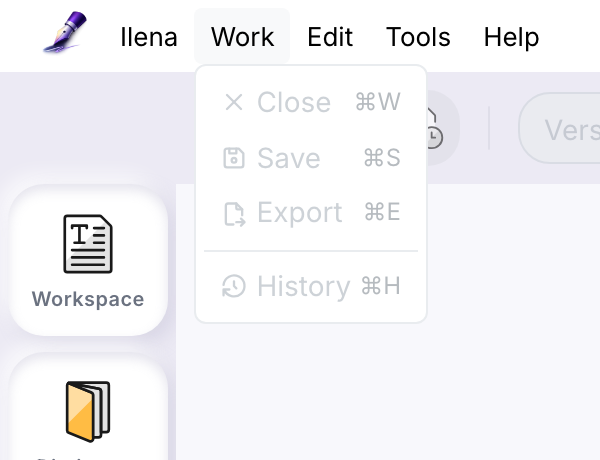
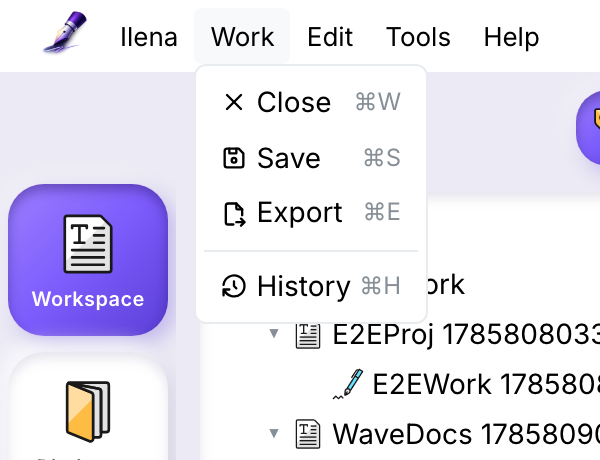
Export needs a work open. With nothing open, the whole Work menu — Close, Save, Export, History — stays disabled, shown above. Open or create a work from the workspace and the menu lights up:
What the PDF looks likeDirect link to What the PDF looks like
The PDF mirrors your on-screen typography, one line type at a time:
| Line type | Font in PDF | Size | Notes |
|---|---|---|---|
| Title | Helvetica | 27 pt | Matches the 36 px on-screen size. |
| Verse | Helvetica | 13.5 pt | Matches the 18 px on-screen size. |
| Indication | Courier, italic | 13.5 pt | Matches the 18 px on-screen size. |
| Legal | Helvetica, gray | 7.5 pt | Matches the 10 px on-screen size. |
Bold, italic, underline, and strikethrough formatting carry over. Line spacing is tuned per type — 1.4× on titles, 1.8× on verses and indications, 1.6× on legal lines.
Marking does not carry into the PDF. A mark is a temporary highlight for your current editing session only — it's never saved with the work, so it won't appear when you export, even if it's still visible on screen right now. See The editor for what marking is for.
Gutters (feet, emotion) and the status bar don't appear either — the export is a clean copy of your lyric sheet, not a screenshot of the editor.
What the Text and Markdown files look likeDirect link to What the Text and Markdown files look like
Both are plain UTF-8 files with no special software required to open them — built for taking your words out of Ilena and into any ordinary editor.
-
Text (.txt) is the reading of your work and nothing else: every line's words, one source line per output line. Bold, italic, and similar formatting aren't represented — there's no markup in plain text to carry them.
-
Markdown (.md) keeps that formatting and gives each line type its own representation:
Line type Markdown Title # Your title, on its own lineVerse Plain text, line breaks preserved Indication Italic Legal > Quoted, the usual way Markdown sets off a byline or creditBold, italic, underline, and strikethrough survive as their usual Markdown (or, for underline, plain HTML) markup, and stanza breaks — a blank line between two verses — are preserved so the shape of your piece reads the same way it does in the editor.
Both formats carry emoji exactly as written, and both round-trip French and Spanish accents and special characters correctly.
The file you getDirect link to The file you get
The downloaded file is named after the work, with any character that isn't
safe in a filename replaced by an underscore, and the name cut off at 120
characters. The extension matches the format you picked — .pdf, .txt,
or .md.
What can go wrongDirect link to What can go wrong
If export fails, you'll see a Failed to export the work. Please try again. notice. Try again in a moment; if it keeps failing, reach out through Help → How to get support.
What's not exportable yetDirect link to What's not exportable yet
Exports are one work at a time — there's no way to bundle several works into a single download.