Dictionary
Look up a word without leaving the canvas — definitions, synonyms, antonyms, lexical field, family, rhymes, homophones, expressions and figures of speech, in a drawer that opens beside your text.
Opening the dictionaryDirect link to Opening the dictionary
- Press Cmd/Ctrl+D.
- Tools → Dictionary in the menu bar.
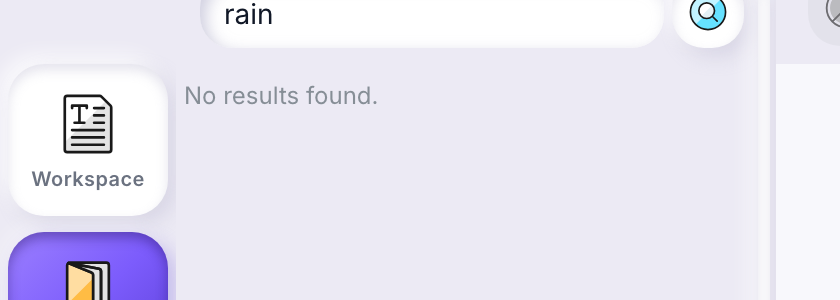
- Click Dictionary in the tool palette on the left edge of the editor (its three entries are Workspace, Dictionary and Ideas basket).
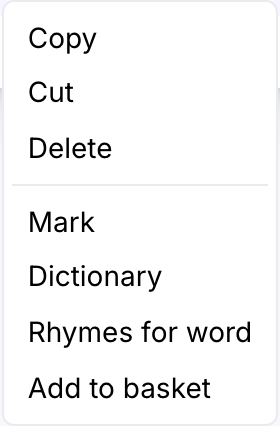
- Select a word in the canvas, right-click it, and choose Dictionary — the drawer opens with that word already searched.
What you get backDirect link to What you get back
The nine sections open one at a time, like an accordion: Definition
opens as soon as the drawer has something to show, and every new lookup
reopens it, whatever section you had left open on the last word. Clicking a
folded heading opens it and folds whichever was open before — the one
currently open can't be folded by clicking it again, so there's always
exactly one to read. Each heading carries a count (Synonyms · 10), and a
section that answered with nothing is shown greyed and can't be opened at
all — the count of zero is the whole answer, and there's nothing behind it
to unfold.
Behind the scenes a lookup still asks for every section at once, and each fills in its count as soon as its own answer arrives — no section waits on the others, whether or not it happens to be the one open on screen:
- Definition — one or more senses, each with usage examples where the dictionary has them.
- Synonyms — similar-meaning words. Click one to look it up in turn.
- Antonyms — opposite-meaning words, same behavior.
- Lexical field — the words the concept ties to this one, across nouns, verbs and adjectives ("water" → source, drop, pure, drown): the material a poem is made of, closest words first. Same chip as a synonym, click one to look it up in turn — a word can appear in both sections, and that's two answers to two different questions.
- Family — the words the language itself ties to this one, each labelled with what it is to your word: feminine, masculine, noun, verb, adjective, adverb, agent, diminutive, augmentative, collective ("sing" → song, singer, singing). Plurals and conjugated forms aren't a family, and an opposite by prefix is an antonym, not a relative. Families are short, and many words have none — the section says so.
- Rhymes — one list, every rhyme once, grouped by category from the strongest down, with its category (or categories) written under the word. The section's count is the number of rhymes.
- Homophones — words that sound like this one but are spelled differently, each with a short gloss so you can tell them apart (English "there" / "their" / "they're", French "vert" / "verre" / "vers"). Most words have none, and the section says so plainly.
- Expressions — idioms and set phrases that contain the word, with what they mean ("for love nor money", "raining cats and dogs") — not proverbs, not simple word pairs. Most words have none.
- Figures of speech — the figures the word has been used in, each labelled with its device — metaphor, simile, personification, metonymy, hyperbole, litotes, oxymoron, antithesis, periphrasis, synecdoche — and glossed in a line ("a heart of stone" — metaphor — someone who feels no pity). Not the idioms above, which the language has settled on and whose meaning you simply have to be told; and not the sound devices, which are the Rhymes' business. Most words carry a handful, and a function word carries none.
A section still waiting on its answer is missing from the accordion entirely — not even its heading — which over an empty space would read as "no results" for something the section hasn't actually found out yet. A single small spinner sits below the sections until the first answer arrives, and goes as soon as there is something to read — or once every section has answered, even if all of them came back empty.
When you're corrected, or asked which word you meantDirect link to When you're corrected, or asked which word you meant
Type a misspelling, or a word shared by several unrelated meanings, and a "Did you mean" line appears above the results: the word the dictionary actually answered for — when it isn't the one you typed — followed by any other candidates. Click one to search it in turn.
- A dropped accent or a typo is corrected silently on the next few characters, but if the correction is uncertain the drawer still shows it as a suggestion rather than guessing for you.
- A word shared by several unrelated meanings (French "peche": pêche the fruit, or péché a sin) lists every candidate, so you pick the one you meant instead of reading the wrong one.
The five rhyme categoriesDirect link to The five rhyme categories
Rhymes aren't sorted into "good" and "bad" — they're sorted into five kinds, so you can pick the one that fits the line you're writing, strongest first:
| Category | What it means for your lyric |
|---|---|
| Rich | The strongest match: the stressed vowel, everything after it, and the sound right before it all line up. |
| Exact | A full rhyme: the stressed vowel and everything after it match; the sound before it doesn't have to. |
| Poor | Only the very last vowel sound matches — the weakest of the five, useful in a pinch. |
| Assonance | The stressed vowel matches, but what follows it doesn't — a softer echo rather than a rhyme. |
| Near | Close but not identical. Useful when an exact rhyme would force an awkward word choice. |
LanguageDirect link to Language
The dictionary follows the language of the work you have open (English, French, or Spanish). Without an open work, it follows your interface language instead.
When a lookup failsDirect link to When a lookup fails
Each section can succeed or fail on its own — one word can show its
definitions and synonyms while its antonyms or rhymes failed to load, or
the other way around. A section with genuinely nothing to show is greyed
out and can't be opened, its heading reading · 0 — there being nothing
behind it is the whole answer. A section that could not be fetched stays
open-able and says Could not load this section. when opened, with a
small retry button that re-issues only that section — the others keep
whatever they already have.
Some answers arrive richer than othersDirect link to Some answers arrive richer than others
The dictionary builds up what it knows about a word over time. The first time anyone looks up a word, you get a quick answer built on the spot; a background pass then goes over it in more depth and fills in whatever wasn't asked for the first time. There's nothing to wait for and no progress to watch — search the same word again later, and you may simply see more than you did the first time.
Saving a word for laterDirect link to Saving a word for later
The same context menu that opens the dictionary also has Add to basket, for saving a word or rhyme you're not ready to use yet rather than looking it up. See Ideas basket.