Import
Bring songs you already have — files sitting in a folder outside Ilena — straight into your workspace. Drop a file on a row and it becomes a work; drop a folder and its whole shape comes with it.
What Ilena readsDirect link to What Ilena reads
Five formats, matched by extension: .txt, .md, .rtf, .pdf, and .docx. Ilena reads the file, sorts its lines into verses and indications, and figures out its language — then saves it exactly the way any other save works, which is what fills in the feet and the emotions.
A .md file's bold and italic survive as formatting on the line; headings, list markers and
quote markers are stripped rather than kept as text, since import never produces titles — only
verses and indications.
ImportingDirect link to Importing
- Drag and drop — drag a file or a folder from your computer and drop it on your author row or a project row in the workspace tree. The row highlights if it can receive the drop.
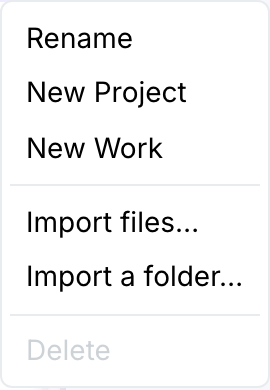
- From the menu — right-click (or use the row's own menu button) on your author row or a project row and choose Import files… or Import a folder…. Both open your computer's ordinary file picker and lead to the same import — same destination, same checks, same report.
Only your author row and project rows can receive an import. Import files… and Import a folder… stay in the menu but greyed out when a row can't take a drop right now — for example while another import of yours is already running.
What a drop becomesDirect link to What a drop becomes
- A file becomes a work, named after the file without its extension.
- A folder becomes a project, named after the folder — and every subfolder inside it becomes a project too, as deep as it goes, even one that turns out to hold nothing Ilena can import.
- If a name is already taken by a sibling, a number in parentheses is appended —
song (1),song (2)— the same rule that already applies everywhere else a node is named.
Nothing is ever merged. Importing the same file twice gives two separate works. There's no "already imported" check and no way to update one by dropping the file again — remove the one you don't want from the tree instead.
While it runsDirect link to While it runs

A single file finishes in a few seconds. A folder shows its progress — how many files of how many — and the new works and projects appear in the tree as they're created, in the order they were found, so you can watch your catalogue fill in rather than stare at a spinner.
The reportDirect link to The report
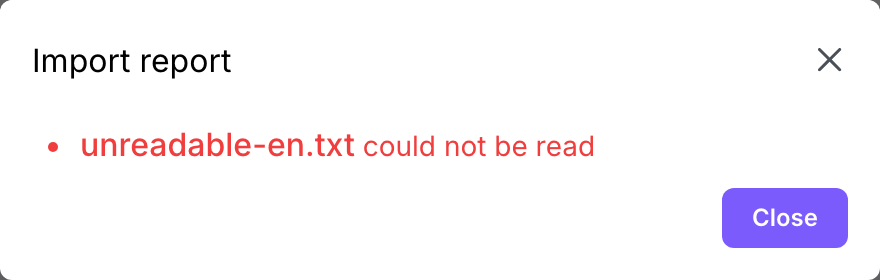
When an import finishes, a report appears only if there's something worth reading — a drop where every file worked closes without any dialog at all, since the tree already shows the result. The report lists, by name:
- a file Ilena could not read, even though its extension is supported (a PDF with no text
layer, a corrupted
.docx, text that isn't valid UTF-8); - a file whose name, once its extension is removed, is empty or too long;
- a file with too many lines for a single work, or that's simply too large;
- a file that came through empty — it still becomes a work, just one with nothing in it yet.
Files with an extension Ilena doesn't support are skipped without a word — they were never songs to begin with, so there's nothing to report.
Your import allowanceDirect link to Your import allowance
Ilena shows how much of your yearly import allowance is left as a percentage, at the top of the workspace tree — never as a line count, since nobody knows offhand how many lines their own folder holds. It resets twelve months after you first subscribed, not on your billing date.
If a drop would use more than your remaining share, nothing is imported — you're told how many of the files would have fit, and you can try a smaller batch.
Importing needs an active subscriptionDirect link to Importing needs an active subscription
A row only accepts a drop while your subscription is active. A trial doesn't count — no row highlights and nothing can be dropped until you've subscribed. The same is true if a payment has failed: import is the one gesture that costs the most to run, so it's the first thing that pauses.