Inspiration
Ilena can suggest how a verse line might continue. There are two independent modes — each with its own toggle, and each reaching you a different way.
Turn a mode on
Open Ilena → Settings. Both toggles live on the General tab:
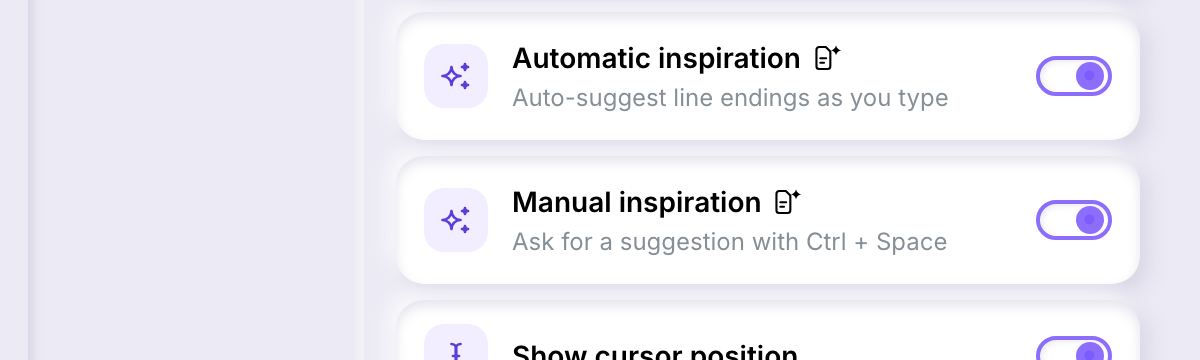
- Automatic inspiration — auto-suggest line endings as you type.
- Manual inspiration — ask for a suggestion with Ctrl+Space.
Both are marked with a small badge next to their name: it flags that turning the setting on means Ilena writes suggested content for you. Both can be on at once, or off, independently of each other.
Automatic inspiration — ghost text
With automatic inspiration on, place your cursor at the end of a verse line that already has text and keep writing, or simply pause. After a short delay, Ilena may show a continuation as pale, greyed-out text right after your cursor — this is ghost text.
- Press Tab to accept it: the suggested text is inserted where the ghost text was.
- Keep typing, or press Escape, to dismiss it.
Ghost text only appears while your cursor sits exactly at the end of a non-empty verse line — it won't appear mid-line, on an empty line, or on title, indication, or legal lines.
Manual inspiration — the suggestion list
With manual inspiration on, place your cursor on a verse line that already has text and press Ctrl+Space. Instead of a single inline continuation, Ilena opens a small list of alternative endings for that line.
- Use ↑/↓ to move through the list.
- Press Enter or Tab to accept the highlighted one — it replaces the line from your suggestion point onward.
- Press Escape to dismiss the list without picking anything.
What suggestions are based on
Both modes send Ilena the language of the work and the text already on the line; manual inspiration also passes along the feet count and emotion of the line before it, when Ilena has already analysed one. Neither mode fires on an empty line, and both require the setting to be on — turning a toggle off in Settings stops that mode from firing anywhere in the app.
If nothing appears after a request — no ghost text, no list — it simply means no suggestion was available that time; nothing you did was wrong, and neither mode surfaces an error for it.