Ideas basket
Somewhere to put a word, a rhyme, or a phrase you don't want to lose, without breaking your flow to file it into a work. The basket is shared across your whole library — not tied to one project or one work.
Opening the basket
Click Ideas basket in the tool palette on the left edge of the editor, alongside Workspace and Dictionary.
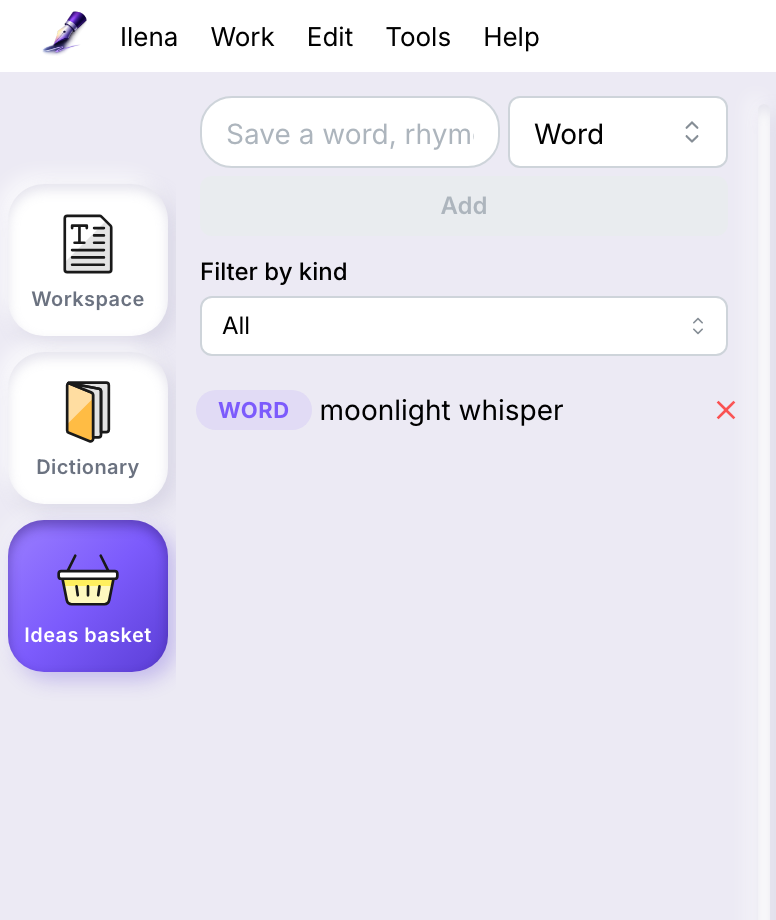
There's no keyboard shortcut for it — only Workspace (Cmd/Ctrl+O) and Dictionary (Cmd/Ctrl+D) have one. See Keyboard shortcuts.
Adding an idea
Type into the field at the top of the drawer, pick a kind — Word, Rhyme, Phrase, Image, or Note — and click Add, or press Enter.
There's a second way, faster when the idea is already on the page: select text in the canvas, right-click, and choose Add to basket.
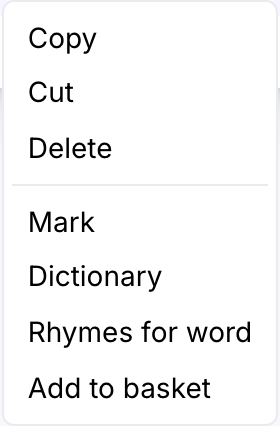
This opens the drawer with your selection already filled into the field — pick a kind and click Add to save it, or edit the text first if you want to save something close to your selection rather than the selection itself.
Filtering and deleting
Use Filter by kind to narrow the list to one category at a time, or leave it on All. Delete an idea with the × next to it — there's no undo, so make sure it's the one you meant.
If a save or delete fails
If the basket can't reach the server — a dropped connection, an expired session — it tells you, right in the drawer: "Could not save your idea. Please try again." or "Could not delete this idea. Please try again."
Nothing is lost while that message is showing. A failed save leaves what you typed in the field, so you can just try again; a failed delete leaves the idea in the list, since it's still there on the server.
What it's for, and what it isn't
The basket holds loose fragments you might use later — it isn't a second place to draft lines, and ideas don't attach to any particular work. If you're shaping something into an actual lyric, move it into the canvas of the work it belongs to.
Ideas persist across sessions — they're saved to your account, not just kept in the browser tab, so they're still there next time you sign in.