Open the dictionaryOpen the dictionary
Use any of these:
- press ⌘ + D;
- open Tools → Dictionary;
- select Dictionary in the tool palette on the left;
- select a word in your work, right-click it and select Dictionary: the drawer opens with that word already searched.
To close it, press ⌘ + D again or select Dictionary in the palette. Esc leaves it open.
Search a wordSearch a word
- Type the word in Search a word... at the top of the drawer.
- Press Enter or select the search button beside the field.
The sections appear one by one as their answers arrive, with a spinner below them while Ilena is still looking. A lookup can take several seconds.
Read the resultsRead the results
Each section heading carries its count, for example Synonyms · 7. One section is open at a time: Definition opens with every new lookup, and selecting another heading opens it and closes the previous one. A section with a count of 0 is usually greyed out and cannot be opened. Rhymes is the exception: it can stay available at 0, and while a lookup is still running it can show 0 before its count arrives.
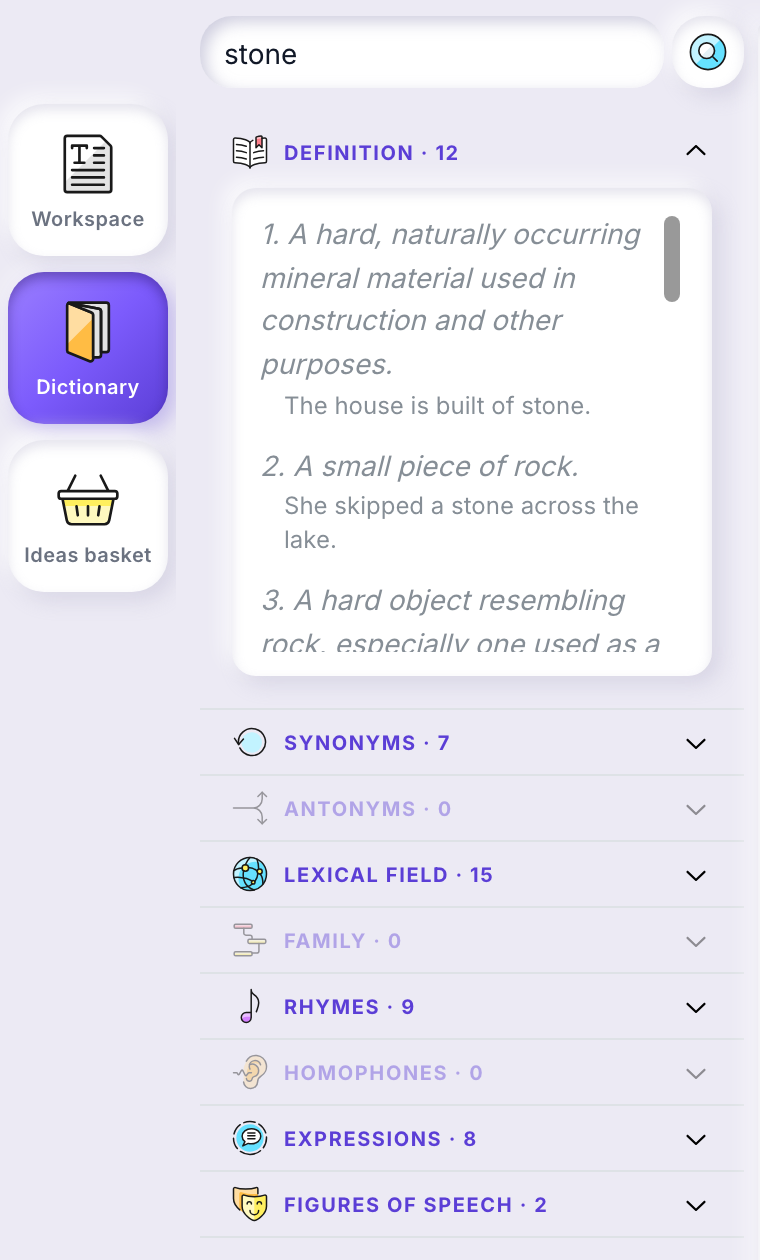
- Definition
- The word’s senses, numbered, each with an example sentence.
- Synonyms, Antonyms, Lexical field
- Words related to yours, each with short labels under it, such as an emotion or a register and a level from A1 to C2.
- Rhymes
- Rhyming words, each with its rhyme category under it.
- Expressions
- Set phrases containing the word, each with its meaning.
- Figures of speech
- Figures using the word, each with the device it rests on and its meaning.
Family and Homophones carry their count too, and open like the others when it is not 0.
Select a word in Synonyms or Rhymes to look it up in turn.
Unexpected resultsUnexpected results
- A Did you mean line appears
- The word you typed was taken for another one. For silense, the drawer shows the results for silence and Did you mean silence above them.
- A section says Could not load this section.
- This was seen when the search was not a word, for example qzxvbnm. A Retry this section button appears beside its heading.