Export the open workExport the open work
- Open the work and save it.
- Open the Work menu and point to Export.
- Select PDF, Text (.txt) or Markdown (.md). Your browser downloads the file.
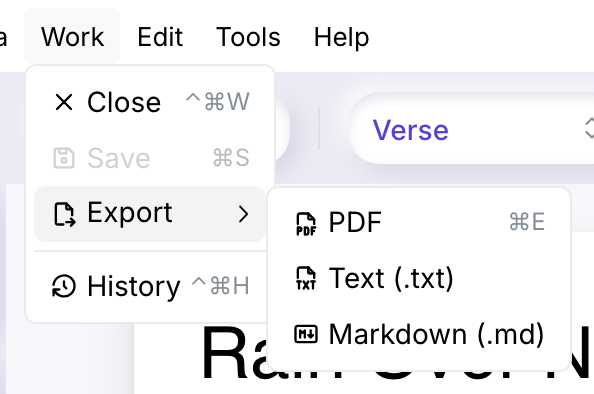
⌘ + E downloads the PDF directly. The file is named after the work, with the extension of its format: .pdf, .txt or .md.
While no work is open, the whole Work menu, Export included, is greyed out.
What each file containsWhat each file contains
| Line type | Text (.txt) | Markdown (.md) | |
|---|---|---|---|
| Title | Large type | Plain line | Heading: # Title |
| Verse | Regular type | Plain line | Plain line |
| Indication | Italic, typewriter type | Plain line | Italic: _indication_ |
| Legal | Small grey type | Plain line | Quotation: > line |
Bold text stays bold in the PDF and becomes **bold** in Markdown. The text file holds only the words, one line per line of the work, with no formatting. The foot counts and emotions shown beside the editor are not exported. The heading comes from the work’s Title line, not from the work’s name.
Example: one work, three filesExample: one work, three files
The work Neon Rain holds a Title line, two Verse lines, an Indication, a third verse with the word silver in bold, and a Legal line. Exported as Markdown, Neon Rain.md reads:
# Neon Rain

Neon signs are blinking slow
Taxis hum where rivers flow
_softly, almost whispered_
The city sings in **silver** light
> Words: Docs Walk, 2026
Neon Rain.mdExported as text, Neon Rain.txt keeps the same lines, without any mark:
Neon Rain
Neon signs are blinking slow
Taxis hum where rivers flow
softly, almost whispered
The city sings in silver light
Words: Docs Walk, 2026
Neon Rain.txtIn Neon Rain.pdf, the title is in large type, softly, almost whispered in italic typewriter type, silver in bold, and the Legal line in small grey type.