Song Text Generator: Draft Without Ghostwriting
Searching for a song text generator often means that you are not looking for a finished song. You may be looking for one missing image, a stronger rhyme, a clearer structure, or a way out of a first draft that no longer sounds like you.
What you really need from a song text generator
The phrase song text generator can describe very different expectations. Some tools produce complete lyrics from a short description. Others help you search for words, explore rhymes, revise a line, or keep track of a draft.
Those are not interchangeable experiences. A complete text may give you something to read, but it may not express your memory, rhythm, or point of view. An editor that helps you examine your own lines can be more useful when you want to remain the person making the creative decisions.
Before choosing a tool, name the problem you are trying to solve:
- Do you need a subject or a more precise angle?
- Is one image too vague?
- Does a rhyme fit the meaning, or only the sound?
- Is the verse too long to sing comfortably?
- Are you revising the text without knowing what to preserve?
Practical tip: Write down the exact difficulty before opening a tool. “I need a better second line” gives you a more useful direction than “I need a song.”
Start with the song, not the tool
A strong draft usually begins with a specific tension, image, or observation. It does not need to be polished. It needs to give you something personal to develop.
For example, “a song about leaving” is broad. “I packed the same blue mug into three different apartments” contains an object, a movement, and a possible emotional question. The mug might represent comfort, repetition, or the inability to leave the past behind. You decide which meaning matters.
Try this short preparation exercise:
- Choose one concrete object, place, gesture, or sentence you remember.
- Write what the detail reveals that a general statement would hide.
- Describe the tension in one sentence, such as wanting to leave while still waiting for someone.
- Draft two or three lines before looking for alternatives.
These steps keep the centre of the song yours. A tool can help you examine language after you have identified what you want to say, but it cannot decide what the memory means to you.
Use assistance without losing your voice
An AI song text generator may be useful for producing possibilities, but a list of possibilities is not the same as a finished creative decision. The important work is comparing those possibilities with your intention and rejecting the ones that sound generic, inaccurate, or unlike you.
Use assistance for focused tasks rather than handing over the whole song. For example, you might explore words related to a particular image, examine rhymes for a line you already wrote, or compare two versions of a phrase. Then read each option aloud and ask:
- Does this keep the meaning I intended?
- Does the image become more concrete or less precise?
- Would I actually use this word in my own voice?
- Does the sound support the mood of the song?
- What does the line lose by becoming shorter, smoother, or more familiar?
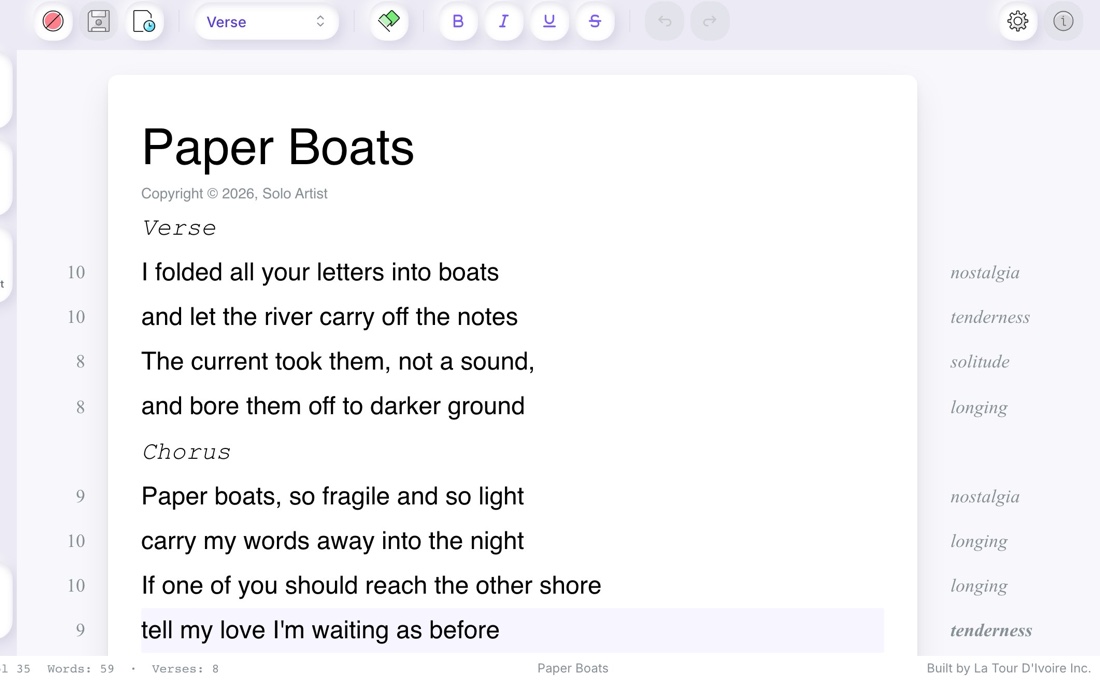
Ilena is an editor for creative writing. It can support a songwriter while they look for words, work with rhymes, and refine their text, while the songwriter remains responsible for the direction and final choices.
That distinction matters because a technically neat line may still be wrong for the song. A rhyme can be exact and emotionally empty. A shorter line can be easier to sing but less specific. Revision is not a search for an objectively perfect sentence; it is a process of deciding what the song needs.
An example: from idea to revision
Imagine that your song is about moving away from a familiar neighbourhood. You write this first couplet:
I left the old street in the evening rain
Every window looked the same
The scene is understandable, but “looked the same” is broad. It may also be less vivid than the first line. Instead of asking a tool to write the next verse, identify the detail you want the couplet to carry: the feeling of seeing familiar homes become distant and indistinguishable.
You might explore several directions:
I left the old street in the evening rain
The porch lights blurred along the train
I left the old street in the evening rain
Each window held a different name
The first revision adds movement and a visual effect, but it changes the setting by introducing a train. The second keeps the neighbourhood closer to the original idea and suggests that every home contains a separate life. It also preserves the rhyme with “rain,” although the rhyme alone is not the reason to choose it.
If neither version sounds true, keep the original and continue revising. You might prefer a less polished line because it contains a detail only you would use. The purpose of assistance is to widen the field of possible wording, not to force the most fluent option into the song.
How to choose the right tool
A free song text generator may be tempting when you want to test an idea quickly. Before using any tool, look beyond the word “free” and ask what kind of help it actually provides. An output limit, a lack of revision controls, or a focus on complete generation may make it unsuitable for the way you write.
Compare tools according to the work you need to do:
| Your need | Useful question |
|---|---|
| Developing an idea | Can I keep my own subject and explore it without surrendering the direction of the song? |
| Finding a rhyme | Can I consider meaning and nuance instead of choosing only the closest sound? |
| Revising a line | Can I compare alternatives while keeping the original version visible? |
| Working on rhythm | Can I use measurements as a guide and still read or sing the line myself? |
| Protecting your voice | Does the tool support my choices, or does it encourage me to accept a complete text? |
There is no single best tool for every songwriter. A general generator may help you understand what direction you do not want. A creative writing editor may be more appropriate when you already have material and want to shape it carefully.
Frequently asked questions
What is a song text generator?
A song text generator is a tool that helps produce or develop written material for a song. Some generators create complete lyrics, while creative writing editors focus on narrower tasks such as exploring words, working with rhymes, or revising existing lines.
Is an AI song text generator the same as a songwriting assistant?
An AI song text generator commonly presents generated text as an answer to a request. A songwriting assistant can take a more focused role by helping a songwriter examine language and compare options while leaving the subject, intention, and final wording to the author.
Can a free song text generator preserve my writing style?
No tool can guarantee that generated text will sound like the author or preserve every personal nuance. To protect your style, begin with your own images and lines, evaluate every suggestion critically, and keep only wording that matches your intention.
How can I use a song text tool without having it write my song?
Use a song text tool for a defined task, such as exploring a rhyme, comparing two formulations, or examining the length of a line. Keep the creative direction in your hands, read the alternatives aloud, and decide what to retain or discard.
What can Ilena help with when I am writing a song?
Ilena is a creative writing editor that helps songwriters find words, work with rhymes, and refine their text. It supports exploration and revision, but the songwriter remains responsible for the song’s intention, choices, and final version.